


Many Java projects have long relied on Drools for business logic through .drl rules. Modernizing these applications can be achieved by migrating DRL rules or existing Drools DMN models to OrqueIO DMN. This process converts rules into standardized, FEEL-based decision tables, ensuring compliance, readability, and seamless integration with modern architectures. OrqueIO’s versioned engine simplifies decision management and fully supports microservices, CI/CD pipelines, and scalable deployments.
Press enter or click to view image in full size
Why migrate to OrqueIO DMN?
1. If you are still using Drools (DRL): OrqueIO DMN replaces the heavyweight, stateful Drools engine with a stateless, cloud-native decision platform. Drools requires KieSessions, agenda groups, JAR packaging, and full redeployments for every change, which slows delivery and limits scaling. OrqueIO DMN provides a lightweight, readable, versioned, and code-independent engine designed for microservices and distributed architectures.
2. If you are already using Drools DMN: Although Drools includes a DMN module, its support is limited: partial FEEL compliance, inconsistent type handling, and frequent need to mix DRL and DMN to work around these limitations. OrqueIO DMN provides a fully compliant engine with complete FEEL support, a robust type system, visual modeling tools, automatic versioning, and predictable execution. Migrating ensures a standardized, future-proof decision layer that performs better, scales reliably, and removes the need for Drools-specific workarounds.
Business Example — Order Processing
Inputs:
- Client Type
- Order Amount
- DMN Decision: Discount Calculation
Final Output: Discount
Before (Drools): Rules were scattered across .drl files, using agenda-groups, accumulate functions, and additional Java logic, making them hard to maintain and test.
After (DMN): Decisions are atomic, readable, stateless, testable, and versioned, providing a clear, maintainable, and scalable approach to business rules.
Modifying the Dependencies
To enable the OrqueIO engine and expose the REST APIs, add the following dependencies to your pom.xml:
<dependencies>
   <!-- OrqueIO webapp -->
   <dependency>
       <groupId>io.orqueio.bpm.springboot</groupId>
       <artifactId>orqueio-bpm-spring-boot-starter-webapp</artifactId>
   </dependency>

   <!-- OrqueIO REST API -->
   <dependency>
       <groupId>io.orqueio.bpm.springboot</groupId>
       <artifactId>orqueio-bpm-spring-boot-starter-rest</artifactId>
   </dependency>

   <!-- In-memory DB -->
   <dependency>
       <groupId>com.h2database</groupId>
       <artifactId>h2</artifactId>
   </dependency>
</dependencies>
👉 All Drools dependencies can be removed.
Replacing Drools with OrqueIO in Java Code
Before — Drools Initialization:
KieServices ks = KieServices.Factory.get();
KieContainer kc = ks.newKieContainer(id);
KieSession ksession = kc.newKieSession();
ksession.insert(order);
ksession.fireAllRules();
Issues:
- Lots of boilerplate
- High version sensitivity
- Session lifecycle management
After — OrqueIO DMN Engine:
package com.example.dmn;

import org.springframework.stereotype.Service;
import org.springframework.beans.factory.annotation.Autowired;

import io.orqueio.bpm.dmn.engine.DmnEngine;
import io.orqueio.bpm.dmn.engine.DmnDecisionTableResult;
import io.orqueio.bpm.engine.variable.VariableMap;
import io.orqueio.bpm.engine.variable.Variables;

@Service
public class DiscountService {

    @Autowired
    private DmnEngine dmnEngine;

    /**
     * Evaluates the discount for a given order using the DMN "discountDecision"
     * @param order the Order object containing clientType and orderAmount
     * @return the calculated discount
     */
    public double evaluateDiscount(Order order) {
        // Create input variables for the DMN
        VariableMap vars = Variables.createVariables()
            .putValue("clientType", order.getClientType())
            .putValue("orderAmount", order.getOrderAmount());

        // Execute the DMN decision
        DmnDecisionTableResult result = dmnEngine.evaluateDecisionByKey("discountDecision", vars);

        // Return the single value computed by the DMN table
        return result.getSingleEntry();
    }
}
Advantages:
- Stateless
- No configuration
- Clear results
- Ultra-lightweight engine
- Automatic Spring Boot injection
Migration Drools .DRL → OrqueIO DMN
This migration transforms procedural, Java-tied DRL rules into standard, declarative, FEEL-based DMN decision models. It simplifies rule logic, removes engine coupling, eliminates session management, and produces readable, atomic, stateless decision tables.
1. Extract DRL Rules
The first step is to identify each Drools rule and its effect, such as field modifications, calculations, or mappings. For example, consider the following DRL rules for calculating discounts:
import io.orqueio.bpm.exemple.dmn.model.Order;
rule "Standard < 100"
    when
        $o : Order(clientType == "Standard", orderAmount < 100)
    then
        $o.setDiscount(0);
end

rule "Standard 100..500"
    when
        $o : Order(clientType == "Standard", orderAmount >= 100 && orderAmount <= 500)
    then
        $o.setDiscount(5);
end

rule "Standard >= 500"
    when
        $o : Order(clientType == "Standard", orderAmount > 500)
    then
        $o.setDiscount(8);
end

rule "Premium < 100"
    when
        $o : Order(clientType == "Premium", orderAmount < 100)
    then
        $o.setDiscount(10);
end

rule "Premium 100..500"
    when
        $o : Order(clientType == "Premium", orderAmount >= 100 && orderAmount <= 500)
    then
        $o.setDiscount(15);
end

rule "Premium >= 500"
    when
        $o : Order(clientType == "Premium", orderAmount > 500)
    then
        $o.setDiscount(20);
end

rule "VIP < 500"
    when
        $o : Order(clientType == "VIP", orderAmount < 500)
    then
        $o.setDiscount(20);
end

rule "VIP 500..1000"
    when
        $o : Order(clientType == "VIP", orderAmount >= 500 && orderAmount < 1000)
    then
        $o.setDiscount(25);
end

rule "VIP >= 1000"
    when
        $o : Order(clientType == "VIP", orderAmount >= 1000)
    then
        $o.setDiscount(30);
end
2. Normalize Input Data
Define the DMN InputData that will replace the DRL conditions:
- clientType → string
- orderAmount → number
3. Transform into a Complete DMN Table
Create a Decision Table in the DMN Modeler where each row corresponds to a specific combination of inputs and the resulting discount. Use the FIRST hit policy whenever possible to ensure that only one rule is applied per evaluation. This makes the decision deterministic, easy to maintain, and directly replaces the corresponding Drools rules.
Press enter or click to view image in full size
4. Handle Complex Patterns
- If a rule modifies multiple objects, split it into separate decisions (e.g., discountDecision, loyaltyPointsDecision).
- Replace Drools accumulate operations with intermediate aggregation decisions that calculate sums or counts before producing the final result.
- Convert procedural or Java-based logic into declarative decisions or external services (e.g., REST, BPMN service tasks).
Here is an example of the discountDecision.dmn XML file:
<?xml version="1.0" encoding="UTF-8"?>
<definitions xmlns="https://www.omg.org/spec/DMN/20191111/MODEL/"
xmlns:camunda="http://camunda.org/schema/1.0/dmn"
xmlns:dmndi="https://www.omg.org/spec/DMN/20191111/DMNDI/"
xmlns:dc="http://www.omg.org/spec/DMN/20180521/DC/"
xmlns:di="http://www.omg.org/spec/DMN/20180521/DI/"
id="discountDecisionDefs"
name="Discount Decision"
namespace="http://camunda.org/schema/1.0/dmn">
<decision id="discountDecision" name="Process Discount Decision" camunda:historyTimeToLive="P180D">
<decisionTable id="decisionTable1" hitPolicy="FIRST">
<input id="in1" label="Client Type">
<inputExpression id="inExpr1" typeRef="string"><text>clientType</text></inputExpression>
</input>
<input id="in2" label="Order Total Amount">
<inputExpression id="inExpr2" typeRef="number">
<text>orderAmount</text>
</inputExpression>
</input>
<output id="out1" label="Discount (%)" name="discount" typeRef="number" />
<rule id="r1">
<inputEntry><text>"Standard"</text></inputEntry>
<inputEntry><text>< 100</text></inputEntry>
<outputEntry><text>0</text></outputEntry>
</rule>
<rule id="r2"><inputEntry><text>"Standard"</text></inputEntry>
<inputEntry><text>[100..500]</text> </inputEntry>
<outputEntry><text>5</text></outputEntry>
</rule>
<rule id="r3">
<inputEntry><text>"Standard"</text></inputEntry>
<inputEntry><text>>= 500</text></inputEntry>
<outputEntry><text>8</text></outputEntry>
</rule>
<rule id="r4">
<inputEntry><text>"Premium"</text></inputEntry>
<inputEntry><text>< 100</text></inputEntry>
<outputEntry><text>10</text></outputEntry>
</rule>
<rule id="r5">
<inputEntry><text>"Premium"</text></inputEntry>
<inputEntry><text>[100..500]</text></inputEntry>
<outputEntry><text>15</text></outputEntry>
</rule>
<rule id="r6">
<inputEntry><text>"Premium"</text></inputEntry>
<inputEntry><text>>= 500</text></inputEntry>
<outputEntry><text>20</text></outputEntry>
</rule>
<rule id="r7">
<inputEntry><text>"VIP"</text></inputEntry>
<inputEntry><text>< 500</text></inputEntry>
<outputEntry><text>20</text></outputEntry>
</rule>
<rule id="r8">
<inputEntry><text>"VIP"</text></inputEntry>
<inputEntry><text>[500..1000]</text></inputEntry>
<outputEntry><text>25</text></outputEntry>
</rule>
<rule id="r9">
<inputEntry><text>"VIP"</text></inputEntry>
<inputEntry><text>>= 1000</text></inputEntry>
<outputEntry><text>30</text></outputEntry>
</rule>
</decisionTable>
</decision>
<dmndi:DMNDI>
<dmndi:DMNDiagram id="DMNDiagram_1">
<dmndi:DMNShape id="DMNShape_discountDecision" dmnElementRef="discountDecision">
<dc:Bounds x="270" y="220" width="200" height="80" />
</dmndi:DMNShape>
</dmndi:DMNDiagram>
</dmndi:DMNDI>
</definitions>Migrating Drools DMN → OrqueIO DMN
1. Inventory existing DMN models
Identify all decision tables, expressions, types, and custom functions used in Drools.
Learn about Medium’s values
2. Detect incompatibilities
Drools DMN lacks full FEEL support. Non-standard expressions, Java/MVEL functions, or missing types must be rewritten in pure FEEL.
3. Clean and simplify
Normalize decision names, reorganize large tables, and replace engine-specific logic with standard FEEL or small sub-decisions.
4. Rewrite expressions in FEEL
Convert conditions, calculations, and transformations so they work natively in the OrqueIO engine.
5. Rebuild the model in the OrqueIO editor
Recreate the decision tables and expressions using OrqueIO’s visual editor for clarity and long-term maintainability.
6. Migrate custom functions & hit policies
Replace Java/MVEL helpers with FEEL or external REST calls, and verify that existing hit policies behave the same.
Using OrqueIO DMN REST API:
POST /engine-rest/decision-definition/key/discountDecision/evaluate

{
  "variables": {
    "clientType": { "value": "Premium" },
    "orderAmount": { "value": 1200 }
  }
}
Result:
[
  {
    "discount": {
      "value": 20,
      "type": "Double"
    }
  }
]
Monitoring DMN:
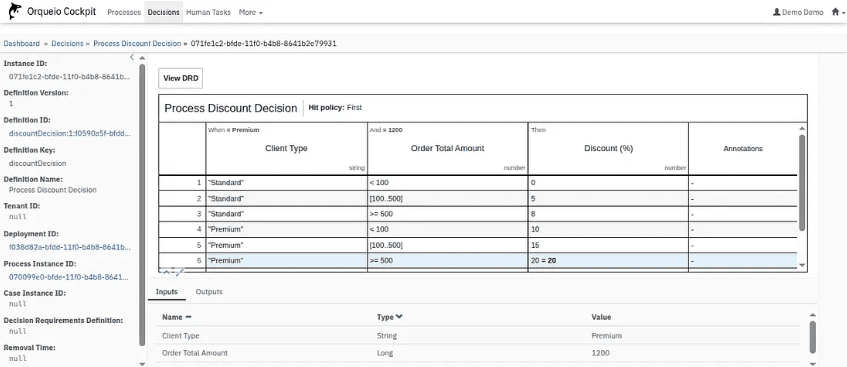
One of the biggest benefits of OrqueIO is the ability to monitor and trace all decision executions in real time.
- Execution History: View inputs, outputs, which row matched, and the executed DMN version.
- Interface Visualization: Inspect rules, conditions, matched rows, and versions directly through the Cockpit.
Press enter or click to view image in full size
DMN Deployment
Standard Deployment:
Place your DMN files directly in src/main/resources/. The engine automatically detects and loads them at application startup, making it simple for small projects or initial testing.
Advanced Deployment:
For larger or dynamic environments, DMN files can be stored in external storage (e.g., object storage, cloud buckets) and exposed via REST APIs. This allows:
- Dynamic reloading of DMN tables without restarting the application
- Centralized management of decision models across multiple services
- Easy integration with CI/CD pipelines for automated updates
Automatic Versioning:
OrqueIO automatically handles versioning of DMN files. Each deployment increments the version (1, 2, 3…). You can:
- Track which version was executed for audit purposes
- Call a specific version explicitly if needed
Press enter or click to view image in full size
Conclusion
Migrating from Drools to OrqueIO DMN is more than a technical swap — it modernizes your decision management architecture.
With a stateless, cloud-native engine, your rules become readable, testable, and versioned, easier to maintain and evolve.
The platform offers fast execution, observability, and simple deployment, keeping business logic decoupled from application code.
Migration can be done gradually, DRL by DRL or module by module, giving immediate ROI without disrupting processes.
Related reading: Migrate your Drools rules to OrqueIO DMN decision tables
Join the OrqueIO community
Follow our updates, chat with the team, and ask your questions.