




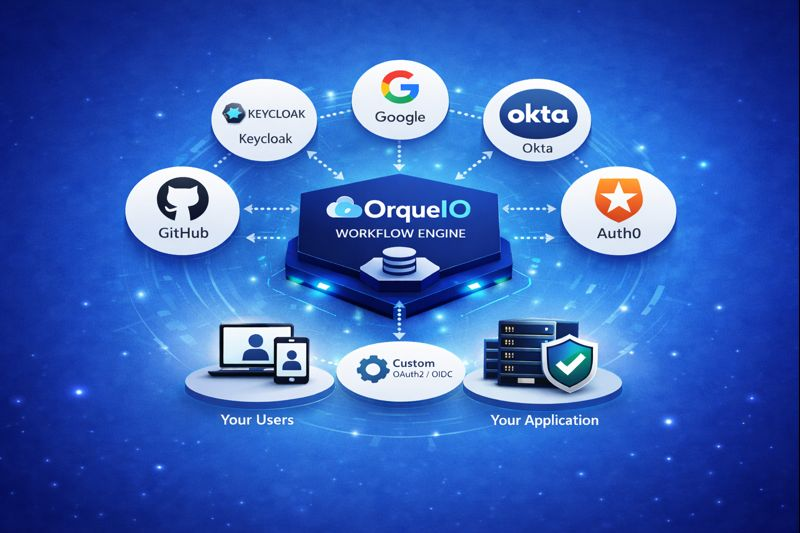
With OrqueIO, authentication should never slow down delivery.
Starting with OrqueIO 1.0.6, Single Sign-On (SSO) is no longer a premium feature or an afterthought. It’s built directly into the core of the platform, free, standard-based, and ready to use in under one minute.
You can now connect OrqueIO to any OAuth2 / OpenID Connect identity provider without plugins, without custom code, and without an enterprise license.
1. Why SSO Should Be a Core Feature, Not a Premium Add-On
Single Sign-On has become the baseline for modern applications and workflow platforms.
Users expect:
- One login with their corporate credentials
- Seamless access across tools
- No more password fatigue
IT and security teams expect:
- Centralized identity management
- Consistent security policies
- Fewer password reset tickets
- Easier compliance and audits
Yet, in many BPM and workflow engines, SSO is still:
- Locked behind enterprise tiers
- Implemented via plugins
- Hard to maintain and customize
We chose a different path.
SSO should not be an enterprise tax.It should be a default capability.
2. Native OAuth2 / OIDC Support in OrqueIO 1.0.6
OrqueIO 1.0.6 introduces native OAuth2 and OpenID Connect authentication, built directly on top of standard Spring Security OAuth2. No proprietary abstraction, no vendor lock-in.
This means:
- Standards-based security
- Long-term maintainability
- Familiar configuration for Spring developers
In most cases, SSO setup takes less than one minute if your provider already exists.
3. Connect Any Identity Provider in Minutes
OrqueIO works out of the box with all RFC-compliant OAuth2 / OpenID Connect providers.
Tested and commonly used with:
- Keycloak
- Okta
- Auth0
- GitHub
Compatible with any standard OAuth2 / OIDC provider.
Need multiple providers? Just add another configuration block , OrqueIO automatically displays all available login options.
4. Zero Custom Code. Zero Plugins.
This is the core differentiator. Most workflow platforms:
- Require plugins
- Charge for SSO
- Force custom authentication code
OrqueIO does none of that. Everything is configuration-only.
What usually takes days of integration work is reduced to a simple YAML configuration step.
5. Quick Start
Getting started is simple. Add one dependency, configure your providers, and your users authenticate with credentials they already know.
Dependency Configuration Include the OrqueIO Security Starter in your project:
<dependency>
  <groupId>io.orqueio.bpm.springboot</groupId>
  <artifactId>orqueio-bpm-spring-boot-starter-security</artifactId>
  <version>1.0.6</version>
</dependency>
2. Provider Setup
Join The Writer's Circle event Add your OAuth2/OIDC provider credentials in application.yml:
spring.security.oauth2.client:
  registration:
    <provider-id>:
      client-id: <your-client-id>
      client-secret: <your-client-secret>
      scope:
        - openid
        - profile
        - email
      authorization-grant-type: authorization_code
      redirect-uri: "{baseUrl}/login/oauth2/code/{registrationId}"
  provider:
    <provider-id>:
      issuer-uri: <provider-issuer-url>
      user-name-attribute: <claim-for-user-id>
Simply add another registration block. OrqueIO automatically displays all configured providers on the login page, allowing users to choose their preferred login method. Ready to Go
Your login page now displays SSO.
That’s it.
6. Unified Identity and User Management (Out of the Box)
By default:
- Users authenticate through their Identity Provider
- OrqueIO automatically creates user accounts
- Sessions are handled transparently
No extra configuration required. This makes OrqueIO ideal for:
- SaaS vendors embedding a workflow engine
- Teams standardizing on centralized IAM
- Organizations reducing credential sprawl
7. Optional: Advanced Group and Role Synchronization
For enterprise-grade IAM scenarios, OrqueIO supports automatic group synchronization.
orqueio:
  bpm:
    oauth2:
      user-sync:
        sync-groups: true
      identity-provider:
        group-name-attribute: groups
Groups are read from token claims Users are assigned automatically on each login Optional cleanup of obsolete memberships remove-obsolete-group-memberships: true
This is optional, powerful, and fully controlled by configuration.
8. Your Authentication, Your Choice
One size doesn’t fit all . OrqueIO gets that.
- No OAuth2 provider configured? → OrqueIO works exactly as before (username/password)
- SSO enabled? → Both authentication methods can coexist
This allows:
- Smooth migration to SSO
- No disruption for existing users
- Gradual rollout across teams
9. Who Benefits Most from OrqueIO SSO?
This feature is especially valuable for:
- Teams migrating from Camunda 7
- Enterprises standardizing on Keycloak or Okta
- SaaS vendors embedding OrqueIO as a workflow engine
- Organizations looking for SSO for BPM platforms without enterprise lock-in
Conclusion
With OrqueIO 1.0.6, SSO is no longer reserved for enterprise plans.
You get:
- Native OAuth2 / OIDC
- Enterprise-grade security
- Zero plugins
- Zero custom code
- Zero enterprise tax
Configure your provider, restart OrqueIO, and your users authenticate with the credentials they already know.
Join the OrqueIO community
Follow our updates, chat with the team, and ask your questions.